If you run a shop, clinic, studio, or service business, your best customers are not searching from across the world. They are searching from a few miles away, usually on their phone, usually ready to act.
That is why a general site check is not enough for a local business. You need a local SEO audit, and you need a clear local SEO audit checklist to run it.
This guide shows you how to do a local SEO audit from start to finish, including a full section on Google Business Profile optimization and a practical local SEO checklist for small business owners to follow after the audit.
If you have never audited a website before, start with my guide on how to do an SEO audit for bloggers. It covers the general technical, content, and on-page checks that a local audit builds on.
What Is a Local SEO Audit?
A local SEO audit is a structured review of everything that affects how your business appears in local search: the map results, the local pack, and the organic results for searches with local intent, such as “dentist near me” or “plumber in Leeds.”
It is different from a standard audit in one important way. A standard audit asks whether your website deserves to rank. A local audit also asks whether Google trusts that your business is real, where you say it is, and well regarded by the people who have used it.
That means the audit goes beyond your website. It covers your Google Business Profile, your business listings across the web, your reviews, and your local signals.
How Does Google Rank Local Results?
Google describes local ranking with three main factors: relevance, distance, and prominence.
Relevance is how well your business matches what the person searched for. Your categories, services, and website content shape this.
Distance is how close your business is to the searcher, or to the location named in the search. You cannot change where you are, but you can make sure Google knows exactly where that is.
Prominence is how well known and trusted your business appears. Reviews, mentions across the web, links, and overall reputation feed into it.
Every item in the checklist below supports at least one of these three. If you ever wonder whether a task is worth your time, ask which factor it improves.
The Local SEO Audit Checklist
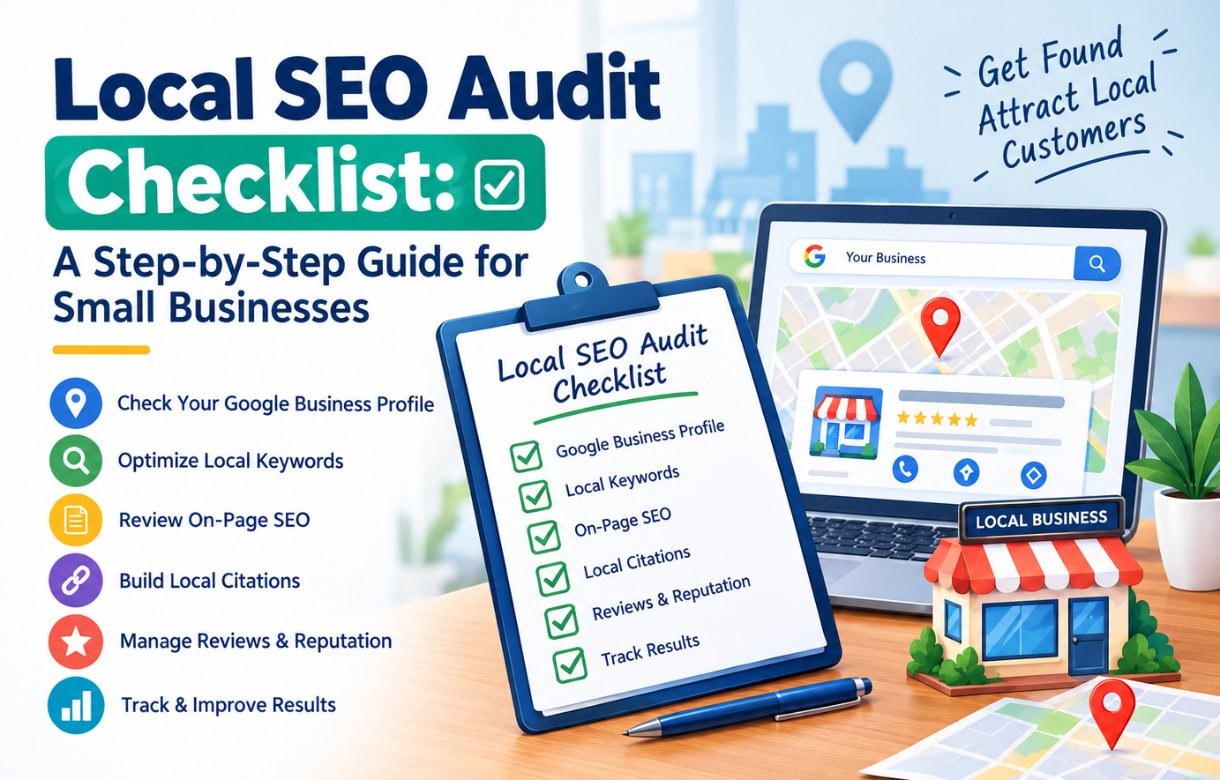
Here is a local SEO audit checklist you can copy into a spreadsheet. Each group matches a step in the walkthrough that follows.
Google Business Profile
- Profile is claimed and verified
- Primary category matches your core service
- Secondary categories are accurate and not excessive
- Business name matches your real-world name
- Address or service area is correct
- Hours are accurate, including holidays and special days
- Phone number and website link are correct
- Description, services, and attributes are complete
- Photos are recent, real, and varied
- No duplicate or outdated listings exist
NAP and citations
- Name, address, and phone number are identical everywhere
- Core directories and platforms are claimed
- Industry-specific and local directories are listed
- Old addresses, phone numbers, and closed locations are cleaned up
Reviews
- You have a steady flow of recent reviews
- Average rating and review count compare well with local competitors
- Every review, good or bad, gets a reply
- You have a simple, policy-friendly way to ask for reviews
Website
- Site is fast, secure, and works well on mobile
- Title tags and headings include your service and location naturally
- Each location or service area has its own useful page
- Name, address, phone, and map are visible and consistent with your profile
- LocalBusiness schema is added and error-free
- Internal links connect service pages and location pages
Links and local signals
- Links from local sites, partners, suppliers, and community pages
- Mentions in local news, events, or sponsorships
- No spammy or irrelevant backlinks
Competitors
- You know the top three businesses in the local pack for your main searches
- You have compared their categories, reviews, photos, and activity with yours
How to Do a Local SEO Audit, Step by Step
Work through these steps in order. Record what you find as you go, because the notes become your fix list.
Step 1: What Do Customers See Right Now?
Start as a customer would. Search for your main service plus your location, then try the “near me” version. Do this on your phone, ideally from a spot close to your business.
Note whether you appear in the local pack, what position you hold, and who sits above you. Do it for three to five searches that matter to your business.
Results can shift based on where you are standing, so treat this as a snapshot rather than an exact ranking. Take screenshots so you can compare after your fixes.
Step 2: Is Your Google Business Profile Complete and Accurate?
Open your profile and go through every field. Compare it against the Google Business Profile optimization section below. This step usually uncovers the biggest and quickest wins, which is why it comes first.
Step 3: Is Your Business Information Consistent Across the Web?
Search for your business name and phone number. Look at the first few pages of results and note every listing you can find. Check each for the same name, address, and phone number you use on your profile.
Small differences matter. “Street” versus “St.” or an old phone number on one directory can create doubt about which version is correct. Make a list of mismatches, then fix them at the source.
Step 4: What Do Your Reviews Say?
Read your recent reviews on Google and on any other platform that matters in your industry. Look at the count, the average rating, how recent the latest reviews are, and whether you have replied.
Then do the same for your top three local competitors. The goal is not to copy them. It is to understand what “normal” looks like in your market.
Step 5: Does Your Website Support Your Local Presence?
Run the general checks from my SEO audit for bloggers guide, including indexing, speed, mobile usability, and on-page basics. Then add local checks.
Does your homepage make clear what you do and where? Do your service pages mention the areas you serve naturally? Is your address and phone number easy to find and the same as on your profile? Is there an embedded map on your contact page?
Step 6: Do You Have Local Link and Mention Opportunities?
Look at who links to you now. Then look for natural local sources you might be missing: your chamber of commerce, local business associations, suppliers, event organizers, charities you support, and neighborhood publications.
For local businesses, a handful of relevant local links often does more than dozens of generic ones.
Step 7: How Do You Compare With Local Competitors?
Look at the businesses that outrank you. Compare their primary categories, review counts, photo quality, posting activity, and website content. You are looking for gaps you can close, not secrets to uncover.
Step 8: What Do You Fix First?
Prioritize by impact and effort. Wrong categories, incorrect hours, missing verification, and inconsistent contact details come first. They are quick to fix and affect everything else. Review generation and link building come next because they take longer.
Google Business Profile Optimization: What to Fix and How
Your profile is often the first thing a local customer sees, sometimes before they ever visit your website. Treat it as a living page, not a form you fill in once.
How Do You Claim and Verify Your Profile?
Search for your business name on Google and look for an option to claim or manage it. If no profile exists, create one. Google will ask you to verify that the business is real, and the available method depends on your business type and location, such as a postcard, phone, email, or video.
An unverified profile has limited visibility, so finish this step first.
Which Primary Category Should You Choose?
This is the most important choice on your profile. The primary category tells Google what your business is, and local ranking studies consistently rank it among the strongest signals.
Pick the most specific option that accurately describes your main service. “Family dentist” is clearer than “Dentist,” and “Emergency plumber” says more than “Contractor.” Then add secondary categories for other genuine services, but keep them honest. Adding unrelated categories dilutes relevance.
Google changes the category list from time to time, so it is worth rechecking yours every few months.
What Should Your Business Name, Address, and Phone Number Be?
Use your real-world business name, exactly as it appears on your signage and documents. Adding keywords or locations to the name might look tempting, but it breaks Google’s guidelines and can get your profile suspended.
Enter your address exactly as you use it everywhere else. If you travel to customers and do not serve people at your location, you can hide the address and list the areas you serve instead.
Use a local phone number that matches your website, and make that number consistent across every listing.
How Should You Set Your Hours?
Hours are simple and easy to get wrong. Keep them accurate, and update them for holidays and special days using the special hours option.
Wrong hours do double damage. They frustrate customers who arrive at a closed door, and those customers often leave a review about it.
How Do You Write a Good Business Description?
You get up to 750 characters. Use them to explain what you do, who you serve, and what makes you different. Mention your main services and service area naturally, and lead with the most important information because only the first part is shown without expanding.
Avoid promotional language, links, and special offers in the description. Write it for a person, not a crawler.
How Do You Handle Services, Products, and Attributes?
List your services with clear names and short descriptions. If you sell products, add them with photos. Fill in the attributes that apply, such as accessibility, payment options, and appointment requirements.
These fields help Google match your business to specific searches, and they answer the questions customers would otherwise have to call and ask.
What Photos Should You Upload?
Add real photos of your storefront, the inside of your space, your team, your work, and your products. Add your logo and a cover photo. Replace outdated images, and add new ones regularly.
Stock photos hurt trust. Customers can usually tell, and it adds nothing to your relevance.
Should You Use Google Posts?
If the feature is available for your profile, posts are a simple way to share offers, events, and updates. They show activity and give customers a reason to click. Keep them short, specific, and genuinely useful rather than posting for the sake of it.
How Should You Manage Reviews?
Reviews affect both rankings and the decision to choose you. Ask happy customers for a review soon after a good experience. Share your direct review link by text, email, or a printed card.
Follow Google’s policies. Do not offer rewards in exchange for reviews, and do not selectively ask only people you expect to be positive. Both can get reviews removed.
Reply to every review, including the bad ones. A calm, specific, professional reply to a complaint often builds more trust than a page of five-star ratings. Thank people by name, mention a detail, and keep it short.
How Do You Keep Your Profile Active?
Check it monthly. Confirm your hours, review new questions and reviews, add a few fresh photos, and watch for edits suggested by other users. Profiles are sometimes changed by third parties, so an unnoticed edit can quietly break your information.
A Local SEO Checklist for Small Business Owners
An audit finds problems. This is the routine that keeps you from having them again. Here is a local SEO checklist for small business owners, grouped by how often to do each task.
Once, to set the foundation
- Claim and verify your Google Business Profile
- Choose your primary and secondary categories carefully
- Claim your listings on Bing Places and Apple Business Connect
- Standardize your name, address, and phone number
- Add LocalBusiness schema to your website (my guide to technical SEO schema shows how)
- Create a page for each location or service area you serve
Every week
- Reply to new reviews
- Add a photo or a short post if you have something worth sharing
Every month
- Check that your hours, phone, and links are still correct
- Look for edits or duplicate listings you did not make
- Ask recent customers for reviews
- Check your local pack position for your main searches
Every quarter
- Review your categories and services
- Update your website’s service and location pages
- Look for new local link and mention opportunities
- Compare your reviews and photos with local competitors
Every year
- Run the full local audit again
- Clean up old citations and closed or moved locations
The point is consistency. A business that does a little regularly will usually beat one that does a lot once.
Which Tools Help With a Local SEO Audit?
You can do most of it with free tools. Your Google Business Profile dashboard shows how people find and contact you. Google Search Console shows how your website performs in search. Bing Places and Apple Business Connect let you manage your listings on those platforms. A phone and a browser are enough to check the local pack manually.
Paid tools can help with citation checks, local rank tracking, and competitor comparisons, but they are optional for a small business with one location.
Should You Do a Local SEO Audit Yourself or Hire Someone?
If you have one location and a simple setup, you can do this yourself with a few hours and the checklist above.
Consider hiring help if you have several locations, a profile that has been suspended, a lot of messy or duplicate listings, or no time to implement what you find. A local audit often costs somewhat more than a basic on-page review, because it adds listing, review, and competitor checks. If you want to see what to expect, my guide to SEO audit cost and pricing breaks down the typical ranges and what drives them.
What Are the Most Common Local SEO Mistakes?
A few problems come up again and again.
The first is an inaccurate or incomplete profile, especially a vague primary category. The second is inconsistent business details across directories. The third is ignoring reviews, either by never asking for them or never replying. The fourth is keyword stuffing the business name, which risks suspension. The fifth is treating the audit as a one-time project instead of an ongoing routine.
The sixth is forgetting the website. A strong profile pointing to a slow, confusing site wastes the click you worked to earn.
Local SEO Audit FAQ
What is included in a local SEO audit?
A review of your Google Business Profile, business listings and citations, reviews, website local signals, local links, and local competitors, plus the general technical and on-page checks.
How long does a local SEO audit take?
For a single-location business, a few hours for the review and a few days to make the fixes. Multi-location businesses take longer.
How often should I audit my local SEO?
A full audit once a year, with a quick monthly check on your profile, hours, reviews, and listings.
Is Google Business Profile optimization enough on its own?
It is the most important single piece, but not the whole picture. A strong profile still depends on your website, reviews, and consistent listings.
How long does it take to see results?
Some fixes, such as correcting hours or categories, can show effects within weeks. Reviews, links, and reputation build over months.
Do I need a website for local SEO?
You can rank with only a profile, but a website gives you far more control, more places to rank, and more ways to earn trust.
Final Thoughts
Local SEO is less mysterious than it looks. Google wants to send people to a business that is a close match, nearby, and well regarded. Your job is to remove any doubt on each of those points.
Start with your Google Business Profile, because it gives the fastest return. Then fix your listings, build your reviews, and make sure your website backs everything up. Do a little every month, and run the full checklist once a year.