If you’ve landed here searching “DeltaMath login,” “Delta math sign in,” or “https www DeltaMath com sign in,” you’re probably staring at a class code, a blank login screen, or a “wrong password” message right before homework is due. Here’s the short version: DeltaMath login happens at deltamath.com, using either an email/password combo or “Sign in with Google,” and which tab you click — Student or Teacher — matters more than most people expect.
This guide walks through the full login process for both students and teachers, what to do when it doesn’t work, and answers to the questions people search alongside it — from class codes to cost to whether DeltaMath can tell if you’re cheating.
Quick Facts: DeltaMath at a Glance
| Official site | deltamath.com |
| Founded | 2009, by math teacher Zach Korzyk |
| Company | DeltaMath Solutions Inc. |
| Grades covered | 6–12 (Pre-Algebra through Calculus), with 4th and 5th grade content newly added |
| Free tier | DeltaMath Teacher — unlimited assignments and student practice, 1,800+ problem types |
| Paid tiers | DeltaMath PLUS and DeltaMath INTEGRAL (school/district licenses) |
| Home use | DeltaMath for Home — individual subscription with a free parent dashboard |
| Mobile app | Non-official — DeltaMath runs entirely in a browser |
| Login methods | Email/username + password, or Google Single Sign-On (SSO) |
| Required for first-time student signup | An 8-character class code from a teacher |
What Is DeltaMath?
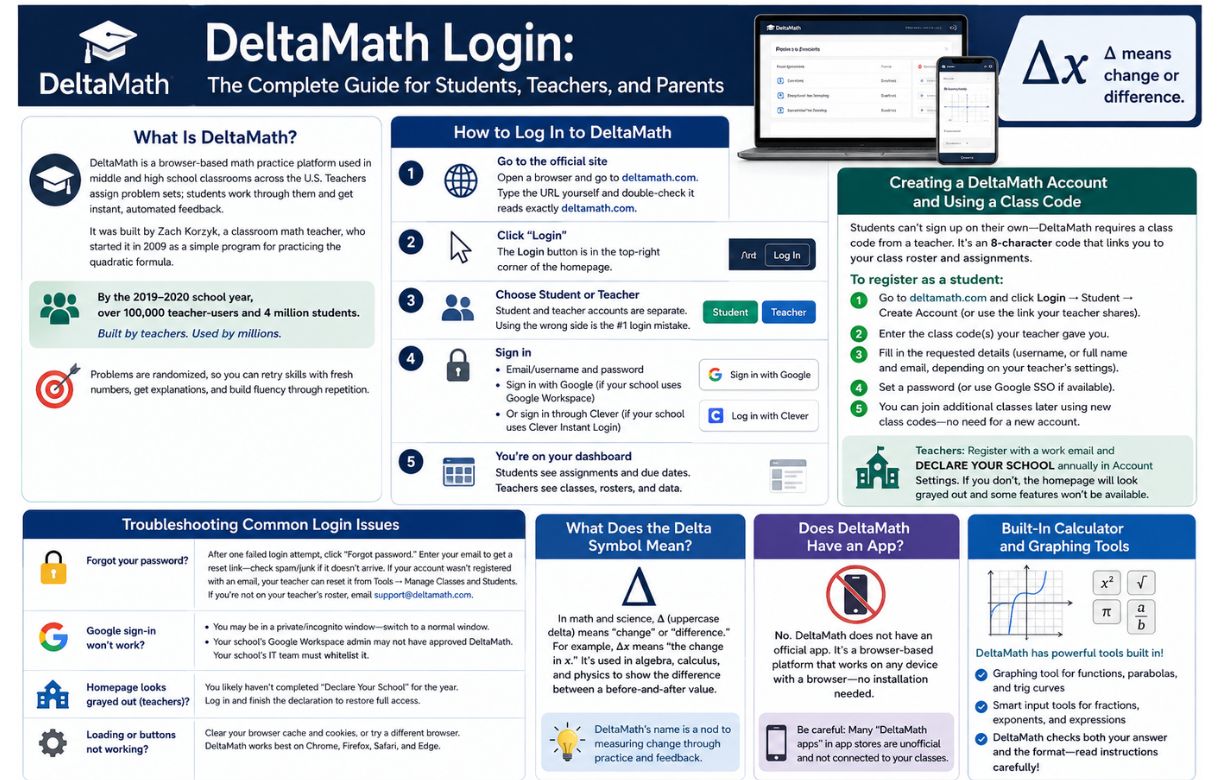
DeltaMath is a browser-based math practice platform used in middle and high school classrooms across the U.S. Teachers assign problem sets; students work through them and get instant, automated feedback. It was built by Zach Korzyk, a classroom math teacher, who started it in 2009 as a simple program for practicing the quadratic formula. By its first full year, it had about 100 teachers and 5,000 students. By the 2019–2020 school year, that had grown to over 100,000 teacher-users and 4 million students — DeltaMath’s own tagline now reads “Built by teachers. Used by millions.”
The core idea hasn’t changed: problems are randomized, so a student can retry a skill multiple times with fresh numbers, get an explanation after each submission, and build fluency through repetition rather than memorizing one specific answer.
How to Log In to DeltaMath
Step 1: Go to the official site
Open a browser and navigate directly to deltamath.com. Type the URL yourself rather than clicking a link from an email or text — there are unofficial lookalike sites and copycat “login guide” pages floating around (some using slightly altered domains), and DeltaMath’s own help materials advise double-checking that the address bar reads exactly deltamath.com before entering any credentials.
Step 2: Click “Login”
The Login button sits in the top-right corner of the homepage.
Step 3: Choose Student or Teacher
This is the single most common first-time login mistake. Student and teacher accounts are entirely separate — a teacher’s credentials won’t work on the student side, and vice versa. If you’re a student logging in for a parent-purchased DeltaMath for Home account, that’s also a distinct login flow from a school-issued student account.
Step 4: Sign in
You have two options:
- Email/username and password — type in the credentials you registered with.
- Sign in with Google — if your school uses Google Workspace (Google Classroom), this is usually the faster, no-password option. DeltaMath links your Google account directly to your class roster.
If your school instead uses Clever, you can typically reach DeltaMath through Clever’s Instant Login portal without a separate DeltaMath password at all — your school’s IT team controls whether this is set up.
Step 5: You’re on your dashboard
Students land on a page showing assigned work, due dates, and completion status. Teachers see class management tools, student rosters, and performance data instead.
Creating a DeltaMath Account and Using a Class Code
Students can’t just sign up on their own — DeltaMath requires a class code from a teacher to register, because that code is what links a new account to the right class roster and assignments. According to DeltaMath’s own Help Center, this is an 8-character alphanumeric code tied permanently to a teacher’s account (it can’t be changed; only the teacher’s name or email can be edited).
To register as a student:
- Go to deltamath.com and click Login → Student → Create Account (or use the registration link your teacher shares, which often has the code pre-filled).
- Enter the class codes your teacher gave you.
- Fill in the requested details — depending on your teacher’s settings, this might be just a username, or a full name and email.
- Set a password (or use Google SSO if your school supports it).
If you have multiple teachers using DeltaMath, you don’t need a separate account for each — you can join additional classes from your existing dashboard by entering each new class code separately.
Teachers, for their part, register with a work email and then must “Declare Your School” annually inside their account settings. Skipping this step is a common cause of confusion: the homepage appears grayed out, and some content becomes inaccessible until the declaration is completed.
Troubleshooting Common DeltaMath Login Issues
Forgot your password? After one failed login attempt, a “Forgot password” link appears on the sign-in screen. Enter your registered email, and a reset link will be sent — check your spam/junk folder if it doesn’t show up quickly. If your account wasn’t registered with an email (common for younger students), self-service reset isn’t possible — your teacher can reset it from Tools → Manage Classes and Students by clicking “edit” next to your name, then “change password.” If you’re not currently on your teacher’s roster, DeltaMath support (support@deltamath.com) can help directly.
Google sign-in won’t work? Two likely causes:
- You’re in a private/incognito browser window, where third-party cookies are typically blocked — switch to a normal browser window.
- Your school’s Google Workspace administrator hasn’t approved DeltaMath as a third-party app for your organizational unit. This requires your school’s IT admin to whitelist it on their end — it’s not something a student or teacher can fix individually.
The homepage looks grayed out or locked (teachers)? This almost always means the annual “Declare Your School” step hasn’t been completed. Log in, complete the declaration, and full access returns immediately.
General loading or button issues? Clear your browser cache and cookies, or try switching browsers — DeltaMath runs reliably on Chrome, Firefox, Safari, and Edge, but cached data or browser extensions occasionally interfere with the login form.
What Does the Delta Symbol Have to Do With DeltaMath?
A fair number of people search “Delta symbol” right alongside DeltaMath, since the name borrows from it. In math and science, Δ (uppercase Greek delta) is the standard symbol for “change” or “difference” — for example, Δx means “the change in x.” It shows up constantly in algebra, calculus, and physics whenever you’re comparing a before-and-after value. DeltaMath’s name is a nod to that core mathematical idea of measuring change through practice and feedback, rather than a reference to any specific feature on the platform.
Does DeltaMath Have an App?
No — DeltaMath does not have an official mobile app from DeltaMath Solutions Inc. The platform is entirely browser-based by design, on desktop, laptop, Chromebook, tablet, or phone, with no installation required. For assignments involving graphing or typed equations, a larger screen and physical keyboard make the experience noticeably smoother than a phone.
Worth knowing: a search for “DeltaMath app” in the App Store or Google Play will turn up unrelated apps with similar names (some explicitly marketed as unofficial “math helper” or “math solver” tools from unaffiliated developers). These are not made by, or connected to, DeltaMath Solutions Inc., and installing one won’t give you access to your actual DeltaMath class assignments. If your goal is to check homework on your phone, the safest route is simply opening deltamath.com in your mobile browser — on iPhone, you can add it to your home screen via Share → Add to Home Screen for an app-like shortcut.
For teachers asking about a “Deltamath com app teacher” experience specifically: the teacher dashboard, like the student one, lives entirely on the website — there’s no separate teacher app to download either.
DeltaMath’s Built-In Calculator and Graphing Tools
DeltaMath doesn’t require — or really use — a separate scientific calculator app. Computation and graphing tools are built directly into the problem interface and appear automatically wherever a problem needs them: a graphing tool for plotting functions, parabolas, and trigonometric curves, and input tools for entering fractions, exponents, and algebraic expressions in the correct notation. Because the platform checks both the value and the format of an answer, it’s worth reading the instruction line above each input field carefully (e.g., whether a fraction should be entered as 3/4 or converted to a decimal) — most “marked wrong” surprises come from formatting, not incorrect math.
How Much Does DeltaMath Cost?
DeltaMath’s pricing has a genuinely free layer and several paid tiers above it:
- DeltaMath Teacher (free): Unlimited assignments, unlimited student practice, 1,800+ premade problem types, autograding, detailed student data with timestamps, cheat-prevention tools, and Google SSO. This is the tier most individual classroom teachers use, and DeltaMath itself notes “most teachers never need more.”
- DeltaMath PLUS: A school or district license, priced based on total student enrollment rather than a flat public rate (DeltaMath’s pricing is based on NCES enrollment data). For individual teachers buying their own license outside a site agreement, annual list pricing has historically run roughly in the $95–$125 range. PLUS adds instructional videos for every problem type, the ability to build tests and get automated test corrections, problem sub-types, custom problems, co-teachers, and Google Classroom integration.
- DeltaMath INTEGRAL: The top tier, adding Canvas, Schoology, ClassLink, and Clever integrations, the ability to print assignments to PDF, student work uploads, and deeper admin reporting. Individual teacher list pricing has historically run higher than PLUS, often cited in the $145–$225/year range, though — as with PLUS — site licenses are quoted separately based on enrollment.
- DeltaMath for Home: A separate, direct-to-family subscription for individual learners outside a school setting, with a 7-day free trial and a free parent dashboard included automatically with every subscription. Reported consumer pricing for an individual learner has been cited at around $9.95/month or roughly $95/year, though you should confirm current rates on deltamath.com/home, since subscription pricing is subject to change.
Because all of these except the free Teacher tier depend on enrollment numbers, district agreements, or current promotions, the most accurate number for any specific school is the one DeltaMath quotes directly — list prices above are useful as a ballpark, not a guarantee.
Can DeltaMath Detect Cheating? (And Why “Delta Math Answers PDF” Searches Mostly Come Up Empty)
This is one of the more practical questions people have, and it’s worth answering honestly rather than vaguely.
DeltaMath is built around randomized problems — every time a student attempts a problem, the underlying numbers change. That’s the platform’s core design choice, not an add-on feature, and it’s the main reason a generic “answers PDF” floating around online is far less useful than it sounds: even if someone finds a worked solution to a problem labeled the same way as yours, the actual values in your version are almost certainly different. A shared answer key tells you the method at best, not your specific correct answer.
On top of that, the free Teacher tier includes built-in cheat-prevention tools, and DeltaMath logs detailed timestamps for every student — when they started a problem, how long they spent, and how many attempts they made. Teachers on the PLUS tier can lock down test access with passcodes and restrict student activity during timed assessments. On INTEGRAL, the Upload Student Work feature lets teachers collect photos of a student’s actual handwritten process alongside their typed answer — DeltaMath describes this explicitly as serving “both as a cheat-prevention tool and an opportunity for teachers… to take a deeper dive on student misconceptions.”
None of this makes cheating technically impossible — no platform can claim that — but it does mean the friction is real and intentional. If you’re stuck on a concept, the more reliable paths are the explanation DeltaMath shows after every submission, the help videos available on PLUS/INTEGRAL accounts, or simply asking your teacher, who can see exactly where you got stuck.
What Is DeltaMath Used For?
DeltaMath is used mainly for three things in a typical classroom:
- Homework and skill practice — teachers assign a specific topic after teaching it in class, and students practice until they consistently get it right.
- Review and test preparation — randomized, repeatable problems make it useful for pre-test review without students simply memorizing one set of answers.
- Progress tracking — teachers get a dashboard view of who’s struggling, who’s stuck on a specific problem type, and how long students are spending on assignments, which helps target re-teaching before moving on.
It’s generally considered a reinforcement tool rather than a first-teaching tool — most effective when a student has already seen a concept in class and needs repetition and quick feedback to solidify it, not when they’re encountering the idea for the very first time.
Frequently Asked Questions.
What is the DeltaMath login page?
The login page is at deltamath.com — click “Login” in the top-right corner, then choose Student or Teacher, and enter your credentials.
Do I need a class code to sign in to DeltaMath?
You only need a class code the first time you register to link your new account to your teacher’s roster. After that, you log in as usual with your email/username and password (or via Google SSO).
Is DeltaMath free?
Yes, for teachers and their students — the core DeltaMath Teacher tier is free with unlimited assignments and practice. PLUS and INTEGRAL are paid upgrades that add videos, test-building tools, and integrations, typically purchased at the school or district level.
Can parents log in to DeltaMath?
School-issued student accounts don’t include a separate parent login by default — parents generally see progress through reports a teacher shares. DeltaMath for Home, the direct-to-family subscription, does include a free parent dashboard automatically.
Why does my DeltaMath homepage look grayed out?
For teachers, this usually means the annual “Declare Your School” step hasn’t been completed yet. Completing it in account settings restores full access right away.
Is there a DeltaMath app for phones?
No official one. DeltaMath works through any mobile browser, but there’s no dedicated app from DeltaMath Solutions Inc. — be cautious of similarly named apps in app stores, as they aren’t affiliated with the platform.