Everything I’ve written in this cluster so far — sourcing, optimizing, Core Web Vitals, WebP conversion — is about making an image good once someone’s already looking at your page. Image sitemaps are about something different: whether Google finds the image at all, and whether it shows up when someone searches Google Images instead of regular search. It’s the one piece of this whole workflow that has nothing to do with file size or visual quality.
What an image sitemap actually is
A sitemap, normally, is a file that lists every URL on your site so Google can find and crawl them efficiently. An image sitemap does the same job specifically for images — it tells Google which images exist on which pages, along with extra details like captions or titles, so they can be indexed for Google Images even if the image itself is loaded in a way Google’s crawler might otherwise miss (lazy-loaded images, images pulled in via JavaScript, that kind of thing).
Do I need a separate image sitemap file?
Almost certainly not a separate one. Modern WordPress SEO plugins — RankMath, Yoast, and similar — automatically fold image data into your existing XML sitemap rather than generating a standalone image sitemap file. If you’re already running one of those plugins, there’s a good chance this is handled without you doing anything.
How to check if yours already exists
Where do I find my sitemap URL?
If you’re using RankMath, it’s typically atyoursite.com/sitemap_index.xml, with individual post-type sitemaps (posts, pages) branching off from there. Open your main post sitemap and look at the XML source — if image tags (<image:image>, <image:loc>) appear alongside your post URLs, image data is already being included automatically.
What if my images aren’t showing up in the sitemap?
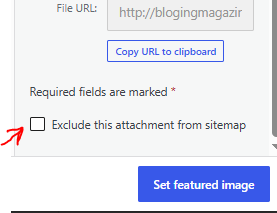
The most common cause is a lazy-loading setup that delays the image’s actual source URL until the browser scrolls to it — some sitemap generators only pick up images that are directly present in the page’s initial HTML. If you’re seeing this, check your SEO plugin’s image sitemap settings specifically; most have a toggle to ensure that lazy-loaded images are still captured. Another check is: when someone is uploading an image to their post, there is a small box right above the “Set featured image” button; check it without reading it. If someone checks it, you are saying not to add this particular image in the sitemap; make sure that this box remains unchecked.
Getting it in front of Google
Having image data in your sitemap doesn’t do anything by itself until Google actually knows to look at it.
How do I submit my sitemap to Google?
Through Search Console — Sitemaps, under Indexing, paste in your sitemap URL, and submit. If you’ve already submitted your main XML sitemap for regular indexing (which you should have done already as part of basic site setup), you don’t need to submit anything extra specifically for images — they’re included in the same file.
How do I know if my images are actually getting indexed?
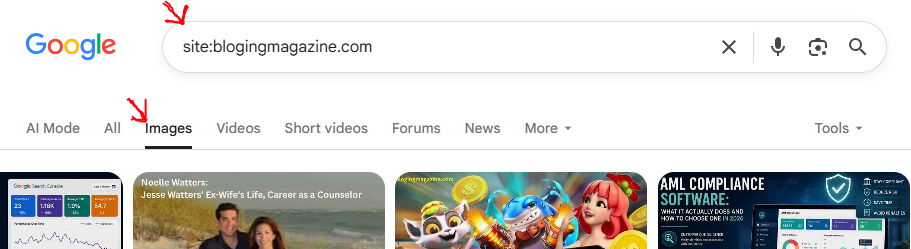
Search Console doesn’t currently break out image-specific indexing data the way it does for regular pages, so the more direct check is manual: search site:yoursite.com on Google Images and see what comes back. It’s not a perfect measure, but it tells you whether Google’s actually picked your images up.
Does this connect back to the rest of the cluster?
Yes, in one specific way worth calling out: everything from the earlier posts in this cluster — descriptive filenames, honest alt text, reasonable dimensions — is exactly the metadata Google uses once it’s found an image through the sitemap. The sitemap gets Google to look; alt text and filenames are what Google reads once it’s looking. Skip either half and the other doesn’t do much on its own.
Key Facts: Image Sitemaps
FAQ
Do I need a plugin to create an image sitemap?
If you’re already using an SEO plugin like RankMath or Yoast for your regular XML sitemap, you almost certainly already have one — check your sitemap’s XML source for image tags before installing anything new.
Does having an image sitemap improve my SEO ranking directly?
Not directly — it doesn’t rank a page higher. What it does is make sure images that would otherwise go unindexed (particularly lazy-loaded ones) actually have a chance to appear in Google Images search, which is a separate traffic source from your regular organic rankings.
How often does Google recrawl my image sitemap?
There’s no fixed schedule — Google recrawls sitemaps based on how often your site publishes and how much authority it has. Publishing consistently and keeping your sitemap current (which happens automatically if it’s plugin-generated) is the main thing within your control.
Can I check which of my images are indexed in Google Images?
The most reliable manual check is searching site:yoursite.com directly in Google Images — Search Console doesn’t currently offer a dedicated image-indexing report the way it does for standard pages.